Text node
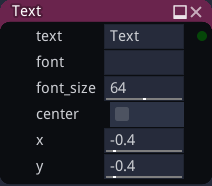
The text node outputs a single texture that shows a text. New lines can be added by using the ‘n’ character (without single quotes).
The text field has a context menu option which opens a text editor which can make it easier to edit multiple lines of text.
Inputs
The text node does not accept any input.
Outputs
The text node provides a single texture.
Parameters
The text node accepts the following parameters:
String to be displayed
Font (both TTF and OTF formats are supported)
Text color
Background color
Font size
The (extra, can be negative) line spacing, if there are multiple lines
horizontal alignment(left, right or center) of the text
Whether the text is centered
X and Y coordinates of the location of the text in the generated image
Notes
The text node can render any unicode character, including emojis.